
I have been using OneDrive for years, and it has worked always. However, few times I experienced that the data was no where to be found. And, I would always blame it on myself that perhaps I did not save it, maybe I saved it in a different folder, and sometimes I just thought perhaps there was no data.
One example of this is that I created a folder to put all the pictures of my marriage (from 2020) and now when I open the folder I cannot find the content that I had put there.

I can see that the folder was created back then, but there is literally nothing in the folder. I have accepted the fate and I can review the photos on Google Photos instead. Here is the only three pictures left in the folder, and as noted by the date these were uploaded back in 2021–given such a date, why would I risk my own marriage photos being lost?

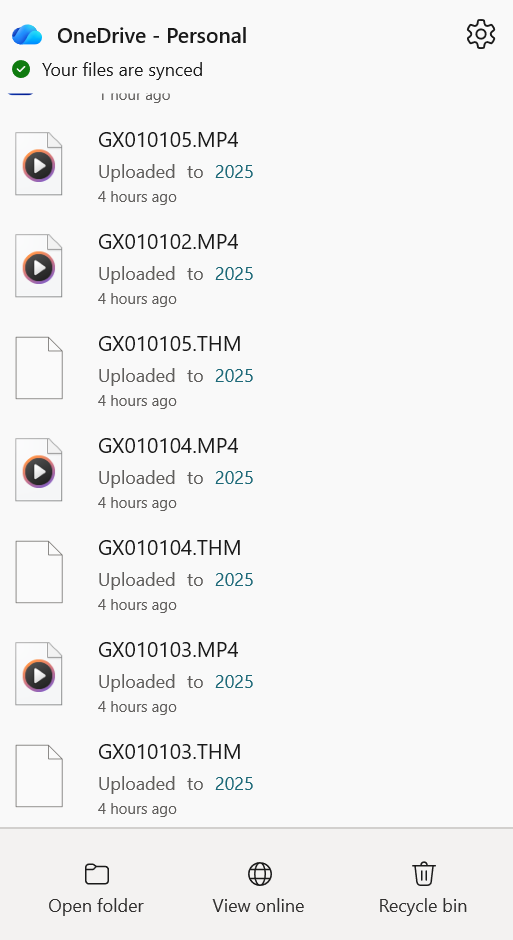
It wasn’t until last week when I had just uploaded a copy of very important data; video footage from my GoPRO, and I could swear that I uploaded it only to see that the data is not there anymore. Here are the two screenshots that show the activity:

The content was uploaded to the folder (I named it 2025) and then after a few hours I could not find the content. Here is a log in the system that says that the file was deleted.

I cannot find the files in the recycle bin, or anywhere and there is no way to read the logs on what happened.
Problem
I can understand one of the following reasons to have happened:
- I deleted the files, by mistake, or through a keystroke (such as CTRL + Z).
- I deleted the files by resynching the folders using a different machine (my mobile, a different laptop)
- The network glitched and the files were deleted.
What I cannot understand is why is there no logs of the activity in the system.
The online folder details tab shows logs, but it does not show:
- When was the content deleted?
- Who deleted it?
- Is there a way to recover the files?
It should be possible to see what is happening, who is making changes, and be able to revert those changes for up to 30 days–which in this case was not met.
OneDrive Subscription
I am not using a freemium version of OneDrive, and this is what’s causing me to panic because. If this set of files can be deleted, I wonder what else could be deleted? The premium version of the OneDrive (or Microsoft 365) is not a cheap subscription and one of the perks is the paid cloud storage. I do use it for personal projects, most YouTube videos that I make have their content saved in OneDrive. I would like to control and audit the activity in my account.
I share this account with my family and that means they also use the services for their activities. If they lose the data, that is not good either.
References:
- This Reddit thread talks about a similar challenge that the author was facing.

You must be logged in to post a comment.